
The quick fix: compare these three values
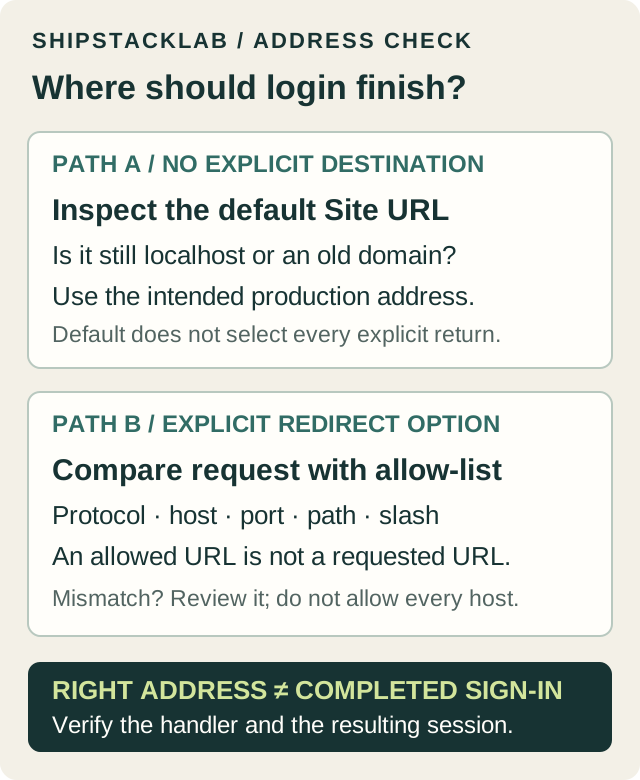
- Site URL: in the correct hosted project, open Authentication → URL Configuration. If localhost is still the default, have the project owner set the intended production HTTPS address.
- Requested return URL: inspect the sign-in code and deployment environment. Check the actual value sent, not just the variable name in a local file.
- Redirect URLs: check that the requested return address is allowed, including its callback path. Keep production entries exact; do not add a catch-all to hide a mismatch.
Supabase's wrong-URL troubleshooting note identifies allow-list matching as a specific cause. That is a starting check, not proof of your diagnosis. If you reach the correct domain but remain signed out, skip to callback and session checks.
Start with the symptom, not a new auth implementation
Record the environment, deployment ID, sign-in method and first wrong hostname or failing path. Do not share complete authentication links, authorization codes, tokens or cookies. The table below is our triage order, not an automatic diagnosis.
| What you see | Compare first | Next check |
|---|---|---|
| Email opens localhost or an old domain | Default Site URL, actual email link and the method's redirect option | Compare the intended host with the link generated by a fresh request. |
| redirectTo seems ignored | The exact requested URL and redirect allow-list | Compare protocol, host, port, path and trailing slash; do not allow every domain. |
| Google shows redirect_uri_mismatch | Google's authorized redirect URI and Supabase's provider callback | Copy the callback from the correct Supabase project's Google provider settings. |
| App callback returns 404 | The deployed callback route | Confirm that path exists in this deployment and matches the requested destination. |
| Right domain, but logged out or looping | Code exchange, session cookies and the app's final redirect | Follow the framework's SSR guide; changing Site URL alone does not create a session. |
Site URL vs Redirect URLs vs redirectTo
The redirect guide separates the fallback Site URL from an explicitly requested return address. Adding an address to the allow-list permits it; it does not make your app request it. Set the production default separately from local or preview destinations.
- Confirm the project. Compare the app's Supabase project hostname with the dashboard project you are reviewing. Record identifiers, not key values.
- Write one intended destination. For example,
https://app.example.com/auth/callbackis not the same path as the homepage. Replace this fictional address with the route your app actually implements. - Compare the deployed value. Check for a localhost fallback, old domain, missing HTTPS, wrong port or a preview value carried into production. If a value was embedded at build time, follow your host's build and release process after correcting it.
- Review the exact allow-list entry. Supabase supports preview patterns but recommends exact production paths. Preserve legitimate environments; do not approve unrelated preview hosts or remove entries blindly.
For local or self-hosted Supabase, the configuration location differs; this article's dashboard steps target hosted projects. Use the configuration guidance linked in the official redirect documentation rather than assuming a hosted-dashboard edit changes a local stack.
Email confirmation or magic link redirects to localhost
Identify the method creating the email. The JavaScript references use options.emailRedirectTo for signUp and signInWithOtp, but options.redirectTo for resetPasswordForEmail. Do not copy an OAuth option name into every email call.
// Destination options only, not a complete auth implementation.
// Replace the example URL with your implemented route.
signUp / signInWithOtp:
  options: { emailRedirectTo: 'https://app.example.com/auth/confirm' }

resetPasswordForEmail:
  { redirectTo: 'https://app.example.com/account/reset-password' }
These are different routes with different jobs. A confirmation handler must complete the chosen verification flow; a password-reset page must also let the user set a new password. Merely arriving at either URL is not completion. Follow the linked method guide for your actual flow.
For customized email links, inspect the relevant template variables: {{ .SiteURL }} uses the configured default, while {{ .RedirectTo }} represents the request's redirect destination. A hard-coded old domain can bypass the intention of a code change. Do not replace the entire verification link with a plain homepage link or remove its verification parameters.
After an approved correction, initiate a fresh email with an authorized test account. An already-sent email is not regenerated by editing settings. Inspect the destination privately and avoid repeated sends to real customers. Email-provider link tracking is another documented source of altered links; investigate it only if the generated and received links differ.
Google redirect_uri_mismatch: which callback is wrong?
For the redirect-based Google flow, Supabase's Google setup places the Supabase provider callback in Google's authorized redirect URIs. Copy the value shown for your project; do not substitute your app's homepage. Custom auth domains and local Supabase can change that value.
The app return route is a second address. In an SSR/PKCE flow, the app's OAuth options.redirectTo points to its own callback handler and must be allowed in Supabase. Google returning to Supabase and Supabase returning to your app are separate hops.
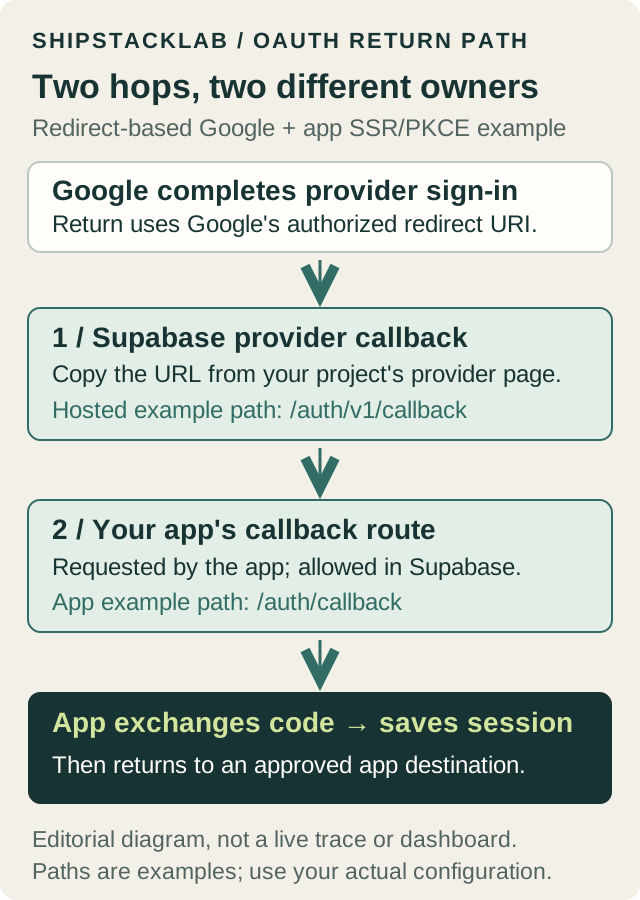
In a comparison record, label each value by owner: Google provider callback, Supabase allowed app return, and app final destination. This prevents fixing one hop by accidentally breaking the other. Do not disable provider validation to clear an error.
The callback loads, but the user is still signed out
First distinguish a missing route from a session failure. A 404 at the callback path is a deployment or routing problem. A handler that loads but redirects back to login needs its auth result checked—not another allow-list wildcard.
For the documented Google PKCE path, the callback exchanges the authorization code using exchangeCodeForSession. The SSR client guide explains cookie-based storage and framework-specific clients. Check exchange errors, cookie persistence and the app's final redirect without logging credentials. A browser-only implicit flow is different; do not paste an SSR callback into it without reviewing the architecture.
Our implementation review rule: keep final destinations on approved app origins or validated internal routes. Do not trust arbitrary next parameters or forwarded-host values merely because login succeeded. Use your framework and hosting trust model; this guide is not a universal callback implementation or an authentication security audit.
Verify the fix from the published entry point
- With approval, use a disposable test identity and start the original sign-in method from the intended environment. Use a fresh email where applicable.
- Record the destination hostname and path at each hop, excluding codes, tokens and email addresses. Confirm no production hop unexpectedly uses localhost or a preview host.
- Confirm the callback succeeds, the app recognizes the intended test user, and a refresh retains the expected signed-in state.
- For password recovery, verify the authorized test user can complete the password update; arrival at the form is not enough.
- Recheck any local or preview flow sharing the changed configuration. Record the exact deployment and result; retain the previous settings privately for a controlled reversal if needed.
Environment / deployment:
Supabase project hostname:
Sign-in method / browser-only or SSR:
Expected app return hostname + path:
Observed wrong hop / status (no tokens):
Site URL / allowed return / actual requested return:
Template or provider callback checked:
One approved change:
Fresh attempt / session after refresh / result:
Unresolved evidence / next owner:
If it still fails, send the responsible developer a redacted record above and the first error—not a raw network export, full email link or environment dump. Your app's cause stays UNKNOWN until those observations support it.
Common questions
Will changing Site URL fix every redirect?
No. An explicit request, customized email template or app-level redirect can still point elsewhere. Compare the first wrong hop instead of repeatedly changing the default.
Should I use a preview domain as the production Site URL?
Keep the stable production default and separately review allowed preview returns. Decide which environment starts the flow and which should finish it; an allow-list is not environment selection.
Is this the same as an OAuth server redirect URI?
No. This guide covers people signing into your app. Making Supabase an OAuth server for third-party apps has a separate client-registration configuration; the redirect guide links to it.
For the broader backend, see the Supabase profile. After login works, use the app data-access checklist: a working session does not prove that users are restricted to their own data. If the wrong domain followed a migration, review the code and service migration inventory. Use Stack Builder to record who owns backend and deployment configuration.